
Technology / News
Why a USB-C Cable Can Charge Your Laptop but Leave Your Monitor Blank
Learn to read USB-C cable labels for charging, file transfers and video. A 10 GB example shows when a faster cable can save time.
Short Article
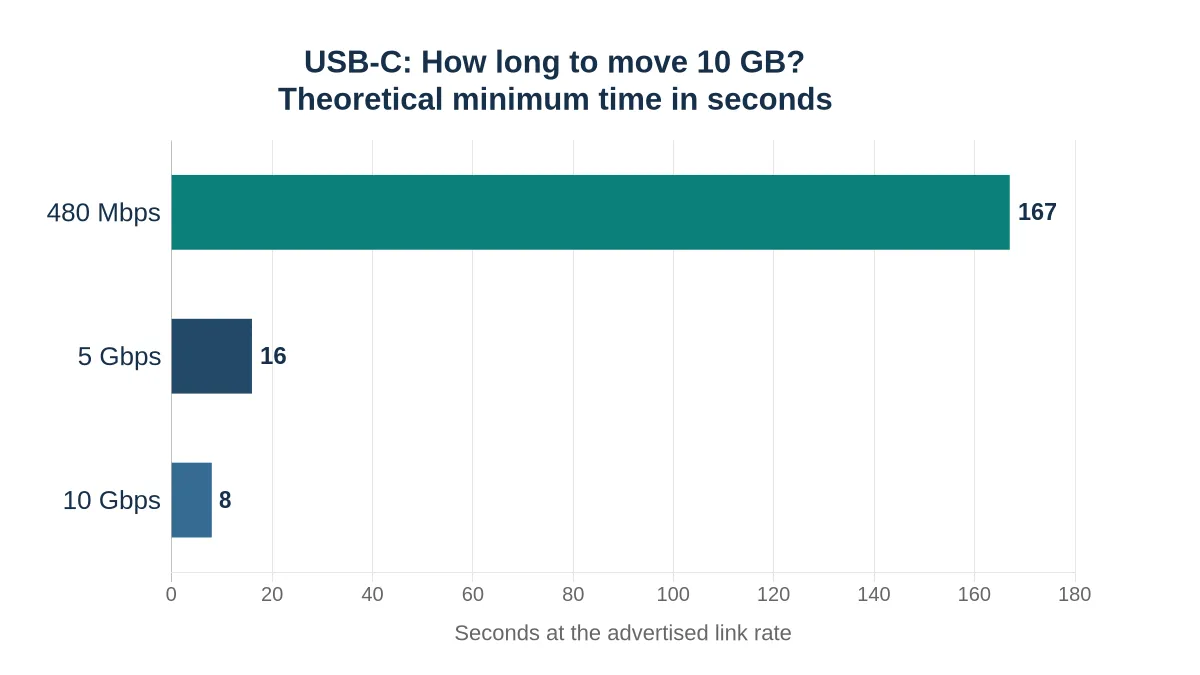
USB-C describes the shape of a plug. To choose a cable, match it to the job. For charging, check the watt rating against your charger and device. A 240-watt cable cannot make a 65-watt charger supply more power. For copying files, look for a speed in gigabits per second. Moving a 10-gigabyte video would take at least about 167 seconds at USB 2 speed, compared with eight seconds at 10 gigabits per second. Real transfers take longer, and the computer and drive must support the speed. For a monitor, check video support on the cable and the exact port you plan to use. A charging light confirms that power is flowing, even when the screen has no picture.
A USB-C cable can charge a laptop at high power, take minutes to copy a video and leave an external monitor blank. All three results can be normal. Consider Apple’s two-metre, 240-watt charge cable. It has a USB-C plug at each end and supports USB 2 data speeds. Apple puts that speed at up to 480 megabits per second and says its USB-C Charge Cable does not carry video. The large number on the box answers just one of three questions.
What do the numbers on a cable tell you?
Watts (W) tell you how much power the cable is designed to carry. Gigabits per second (Gbps) tell you how quickly data can travel over a compatible connection. For an external screen, look for a third specification: support for video at the resolution and refresh rate you want. A refresh rate of 60 hertz means the screen can update its picture 60 times a second.
There is a useful clue on certified cables. Under the USB Implementers Forum’s current marking rules, USB-C to USB-C cables submitted for certification carry a 60W or 240W power marking. Faster data cables also carry a speed marking. USB 2 cables are an exception: they can carry the power mark alone. On an unmarked cable you already own, its age and certification history may be unknown. Check the model’s specification before drawing a conclusion from a missing label.
Will a 240-watt cable charge a phone faster?
Imagine a laptop connected to a 65-watt charger through a 240-watt cable. The charger can supply at most 65 watts. Replace it with a higher-power charger and another limit matters: what the laptop can accept. With USB Power Delivery, the charger offers power levels and the device requests one it can use. The cable must support that level too. The wattage printed on a cable describes its capacity. It cannot tell you how many minutes a particular battery will take to charge.
How much difference does data speed make?
Suppose you need to move one 10-gigabyte video from a computer to an external drive. There are eight bits in a byte, so 10 decimal gigabytes contain 80 gigabits. Divide 80 by the advertised rate in gigabits per second. At 0.48 Gbps, the arithmetic gives about 167 seconds, or 2 minutes 47 seconds. At 5 Gbps it gives 16 seconds. At 10 Gbps it gives 8 seconds.
These are calculated lower bounds. A connection spends some of its capacity managing the transfer, and the drive needs time to write the file. Check the port, cable and drive specifications together. For instance, a 10 Gbps cable connected to a 5 Gbps port still leaves you with the 5 Gbps ceiling, even if the drive can go faster. Dell’s USB-C guide explains how device compatibility limits the connection.
For an occasional document, saving a fraction of a second may be hard to notice. For a camera operator copying several large clips every evening, a slow cable can cost minutes on every job. Before buying a faster drive, try the same large file on the same ports with a cable rated for the speed both devices support. Changing one part at a time makes the result easier to interpret.
Why does the monitor stay blank when the laptop is charging?
A USB-C monitor can supply power while waiting for a picture from the laptop. One common way of sending that picture is DisplayPort Alt Mode, which lets a USB-C port use some of its connections for video. For this setup, check the laptop’s specific port for DisplayPort output, the monitor’s input for USB-C video and the cable for video support. Two ports on the same computer can have different capabilities. VESA’s DisplayPort guide explains what to look for in the device manual.
DisplayPort Alt Mode is not the only route to a picture. Compatible Thunderbolt and USB4 systems can also carry display traffic, but the exact combination of computer, cable, dock and monitor still matters. A USB-C plug or a high charging rating is not proof of video support. Apple’s comparison of its charging and Thunderbolt cables illustrates the difference.
There is another reason a desk may behave differently from its advertised specifications. A dock can divide the high-speed connection between a display and other devices. For example, a DisplayPort Alt Mode connection may use two of its high-speed lanes for video and leave two for USB data, or use four for video. The available display and data speeds depend on the negotiated configuration. This is why a dock’s combined display and storage specifications matter more than either maximum on its own. See VESA’s explanation of DisplayPort over USB-C.
Before replacing a cable, try the check that fits the symptom
The laptop charges, but the monitor is blank. Confirm that the monitor is set to its USB-C video input and that the laptop port supports the display connection described in its manual. If possible, connect the two directly with a known video-capable cable, without a dock or adapter. If the direct connection works, reconnect the dock and check its supported display modes and host cable. If it does not, try another documented video-capable port or cable, changing only one item at a time. A blank screen is a symptom, not proof that the cable is faulty.
The phone charges, but no files appear. On Android, unlock the phone, tap the USB notification and select File Transfer. If the device still does not appear, try a cable you have already used to copy files. Google’s instructions cover both the phone setting and the cable check. A charging icon alone cannot tell you which one is responsible.
You are buying one cable for a desk. Write down the laptop’s charging requirement, the speed of your external drive and the monitor mode you actually use. For example, a desk that needs 65-watt charging, 10 Gbps storage and a 4K screen at 60 hertz has three separate requirements. Check each against the cable and the dock, including whether the dock supports that combination at the same time. If all you need is a charger for your bag, the first number may be the only one worth paying for.
Featured chart and calculations by AVIRALON NEWS. Transfer times are theoretical minimums for one 10 GB file.
ARTICLE REFERENCES
Sources & Links
Explore the original resources and supporting documents.
- USB-IF cable marking rulesusb.org
- USB Power Deliveryusb.org
- Apple charge and Thunderbolt cable comparisonsupport.apple.com
- Apple 240W USB-C Charge Cableapple.com
- Dell guide to USB-Cdell.com
- Google Android file-transfer guidesupport.google.com
- VESA guide to DisplayPort over USB-Cdisplayport.org
External references open in a new tab. Please review the information at its original source.









AVIRALON NEWS / COMMUNITY
Comments (0)
Comments are moderated. Your comment will be reviewed by the AVIRALON editorial team before appearing publicly. Please keep the discussion respectful and relevant.
No approved comments yet.
Commenting will open after moderation and privacy checks are completed.